

Dr David Fraile Navarro, Postdoctoral Research Fellow, Centre for Health Informatics, Macquarie University
In the first instalment of Me and my GPT, I wrote about using large language models to work with scientific references: finding them, weaving them into manuscripts, and checking whether the papers we cite actually say what we claim they do. With tools like Deep Research, GPT is starting to look less like a fancy autocomplete and more like a research assistant who can read.
This time, my GPT and I move from references to something even closer to the foundations of research: data analysis. Increasingly, I hear some version of the same story: “I pasted the numbers into ChatGPT, and it gave me an odds ratio and p-value, is that OK?” My short answer is probably not. But there is a much better way to bring AIs into your analysis workflow, one that keeps you in control, improves transparency, and might even teach you some statistics along the way.
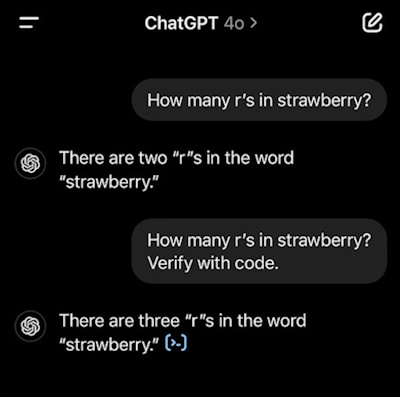
Will you trust this LLM to do statistics?
When the chatbot’s answer felt… wrong
My own turning point came with a small clinical dataset from an observational study. Nothing dramatic: a few hundred patients, a binary outcome measuring 30-day readmission, and a handful of predictors. Out of curiosity, I tried the “lazy” approach first. I summarised the data in a paragraph, pasted some counts into GPT and asked for an odds ratio with a confidence interval and p-value.
Within seconds, I had a beautifully formatted answer. It looked convincing. But I had no idea which test had been used, whether any continuity corrections had been applied, or whether GPT had quietly misread my numbers. When I later ran the analysis myself in R, the result was close but not identical. The difference wasn’t huge, but it was enough to make me uncomfortable. If I couldn’t see the steps, how could I really trust the output?
That was the moment I decided: I don’t want the chatbot to be my statistician. I want it to be my coding tutor and help me write those tests that I will struggle to put into formal language.
Don’t ask for numbers, ask for code
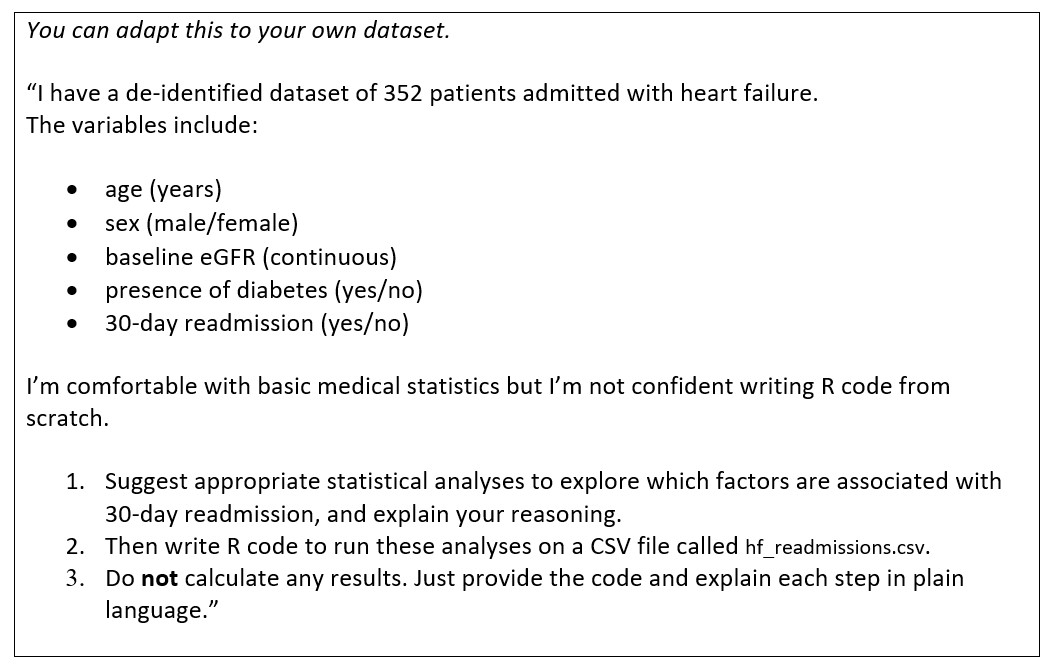
For data analysis, I follow a simple rule: never ask GPT for a result. Ask it to help you inspect, write code, suggest analysis and explain what it’s doing. Instead of handing over my numbers and asking for a p-value, I describe my dataset and ask GPT to suggest appropriate analyses and write the code to run them. I ask it to explain each step as if I’m a clinician who knows basic medical statistics but is rusty with coding. And crucially, I tell it not to make up any results, just to give me code and explanations. That then myself (or ChatGPT, if possible) can run in a code interpreter.
This shifts GPT into three roles at once. First, it becomes an explainer, telling me why a particular analysis makes sense for my study design (then I can find out if that holds for my data and purposes or not). Second, it’s a code generator, writing the R, Python or Stata script for me. Third, it acts as a thinking partner, helping me iterate when I say things like “What if I adjust for age and comorbidities?” or “What if I treat this as time-to-event data?”
I still have to run the code myself and look at the outputs to decide whether they make sense. But now I can see the entire pipeline from raw data to conclusion. The black box has been opened and results are reproducible.
Prompt to try: Heart failure readmissions
Dropping in a CSV: GPT as a friendly data tour guide
Modern GPT-style tools allow you to upload files directly. For health researchers, that usually means a CSV or Excel file. Remember to always de-identify your data and comply with your ethics and governance requirements, of course. Alternatively, you can upload “dummy” data, ask for it to generate the code to run the analysis and then run them locally without exposing any data to the AI providers. A typical workflow for me starts with uploading the dataset (or a dummy one) by dragging and dropping a de-identified CSV into the chat. Then I ask for a plain-language walkthrough: “Please read this dataset and describe each variable, including its type, what it means in everyday clinical language, and any obvious issues like missing values or impossible entries.”
This is often the first time anyone has explained the dataset back to me in such simple terms, which turns out to be useful. You’d be surprised how often this step reveals variables you’d forgotten about or data quality issues you hadn’t noticed. Next, instead of asking for the numbers outright, I ask for code to generate basic descriptive statistics. I might say: “Write Python code to show the number of rows and columns, summarise all numeric variables with means and medians, show frequency tables for categorical variables, and print the percentage of missing data per variable. Explain each step.” The key is that I’m asking for the recipe, not the meal.
Then I ask for simple plots, again as code. I want histograms of key continuous variables, bar charts of categorical variables, perhaps a boxplot showing how age varies by readmission status. By the time I’ve run this script in RStudio or Python, I have a basic descriptive picture of the dataset and a reproducible script I can rerun later. GPT hasn’t “done my analysis”, it’s helped me see my data more clearly and move faster through the essential but boring first steps.
From exploration to analysis without outsourcing your judgement
Once the basics are done, we can ask GPT to suggest more advanced analyses, but with clear constraints. For example, you might explain that your dataset comes from a prospective cohort study and your main question is which baseline factors are associated with 30-day readmission. Then ask GPT to propose an analysis plan in bullet points without code yet, explain why each method is appropriate, and cite two or three standard references or guidelines that you could consult to check its suggestions. (See more details in previous article on how to find and work with References).
Here, I’m deliberately forcing GPT into teacher mode rather than code machine mode. I get a structured analysis plan I can review. I get references I can inspect, and as we discussed in the first instalment, I can ask GPT or Deep Research to pull the actual papers and check that the methods it cites really say what it claims. If something feels off, I can challenge it: “You suggested logistic regression, but the outcome is rare and there’s clustering by hospital. What alternatives would you consider?”. Only after I’m happy with the reasoning do I ask for code.
The new risk: AI-assisted p-hacking
LLMs make it trivially easy to try dozens of models and run increasingly sophisticated analysis. You can say “Now add an interaction term,” then “Now use a different cut-off,” then “Now try stepwise selection.” In a few minutes, you can generate enough exploratory analyses to keep a journal reviewer busy for years. This is powerful and dangerous in equal measure. We already had a problem with data dredging and p-hacking. AI can act as a p-hacking accelerator if we’re not careful.
Some simple guardrails help. Start with the question, not the model. Write down your primary outcome and primary analysis in a protocol, preregistration, or even just your notebook before you begin. Ask GPT to help you implement your plan rather than constantly change it. You can still explore, but label those analyses clearly as post-hoc. Keep a record of your prompts and scripts as part of your analysis log, just like you would with version-controlled code. And use GPT to teach you the limitations of each method by asking explicitly: “In what situations would this analysis be inappropriate or misleading?”
If you’re still unsure after all that, it’s not a sign to ask the chatbot again. It’s a sign to ask a statistician.
Knowing when to phone a friend
There are plenty of situations where I would not feel comfortable relying on GPT’s suggestions without human oversight. Complex survival or competing-risk analyses, clustered or multilevel data where patients are nested in hospitals or you have repeated measures, sophisticated causal inference with propensity scores or marginal structural models, very small samples with many predictors, all of these call for expert input.
In those cases, I treat GPT as a way to clean and describe the dataset, draft analysis code I can bring to a statistician, and formulate sharper questions. If I wouldn’t sign my name under the analysis without speaking to an expert, I don’t let the chatbot be the deciding voice.
A peek at the next frontier: coding agents in your terminal
So far, I’ve described GPT as a conversational assistant that writes code you then run. The next wave of tools goes a step further. Coding agents and terminal-style assistants (such as Claude Code or Codex) can open files in your project folder, modify and run code, produce outputs like tables and plots and insert them into reports, and remember intermediate steps between sessions. In other words, they behave less like a chat window and more like a junior colleague working inside your analysis environment, they are revolutionising coding and software development, they may soon do the same for data analysis and health research.
This is exciting, but it also raises new questions. How do we audit what the agent actually did? How do we prevent it from quietly “cleaning” data in ways we wouldn’t approve? How do we stop agents from becoming very fast, very polite p-hacking machines? Those questions deserve a piece of their own, and in a future instalment of Me and my GPT, we’ll walk through what it looks like to let an AI agent loose, carefully, in a health research project.
Me and my GPT at the data desk
For now, my relationship with GPT and data looks like this. It reads my de-identified CSVs and helps me understand what’s inside. It suggests sensible analyses and points me to methods references. It writes the code I’m too rusty to write quickly myself. And it explains what it’s doing well enough that I can check, challenge, and learn. What it does not do is silently crunch numbers and tell me what is “significant.”
In an era where AI can draft entire manuscripts and generate convincing-looking results, maintaining that line feels important. GPT can be an excellent assistant at the data desk, but the responsibility for the analysis, and the patients and policies it will ultimately affect, still rests firmly with us.